Password recovery
Password Reset
When to Use
- Forgotten password
- Compromised account
- Password policy compliance
- Regular security updates
Reset Process
Step 1: Access Reset Page
1. Click **Forgot Password** on login page
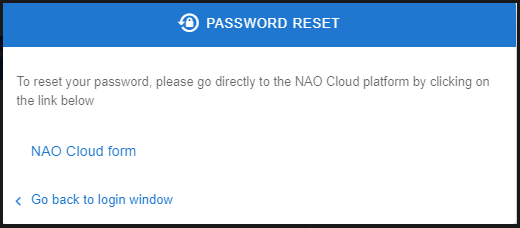
2. New tab opens with password reset page
Step 2: NAO Cloud Redirect

Password reset is handled through NAO Cloud platform
1. Reset page displays message:
"To reset your password, please go directly to the NAO Cloud platform by clicking on the link below"
2. Click NAO Cloud form button
3. New tab opens with NAO Cloud password reset page
Step 3: Request Reset Email
1. Enter your email address on NAO Cloud form
2. Click Reset Password button
3. Check email for reset instructions
4. Email sent only if account exists (security)
Reset Email Not Received
- Check spam/junk folder
- Verify email address is correct
- Wait a few minutes for delivery
- Contact administrator if not received
- Email only sent for existing accounts
Return to Login
- Click Go back to login window link
- Or navigate to `/login`
Related Articles
Account Creation
Overview This guide covers the account creation process for NAO Viewer, including entering personal information, setting passwords, and configuring preferences. Account Creation Sign Up Process Step 1: Access Sign Up Page 1. Navigate to `/signup` 2. ...Authentication Guide
Overview This guide covers the login process for NAO Viewer, including accessing the application, entering credentials, and troubleshooting login issues. Login Accessing NAO Viewer 1. Navigate to your NAO Viewer URL 2. Login page appears ...