NAO Viewer - Overview
Architecture
Communications avec NAO Cloud et NAO JS SDK
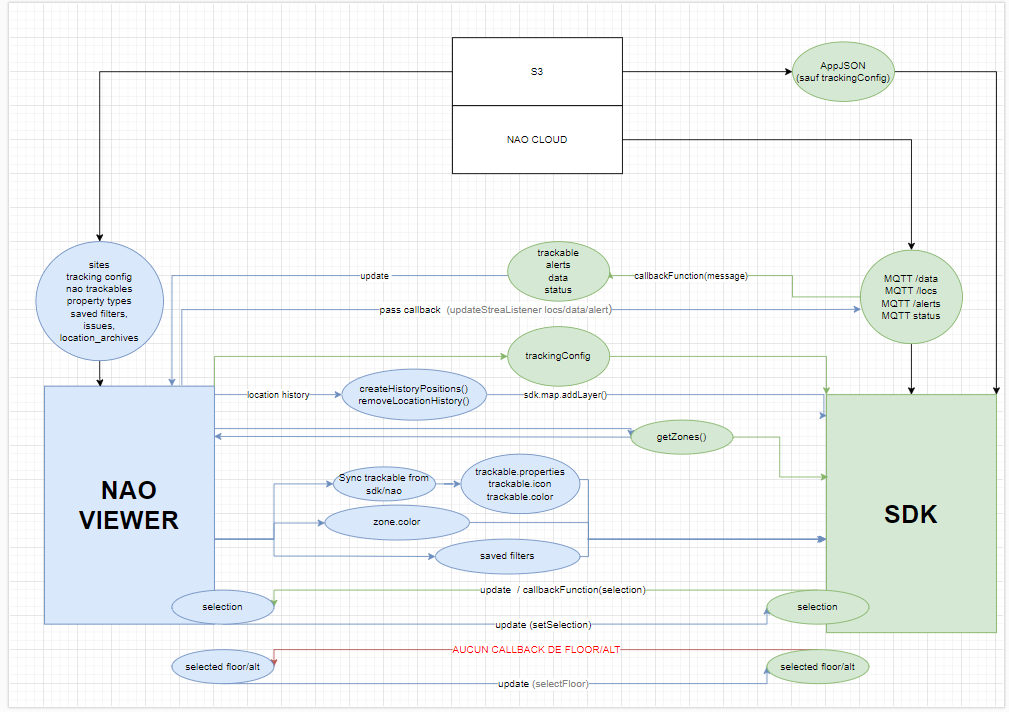
Communications avec NAO Cloud et NAO JS SDK
Related Articles
NAO Flow Overview
NAO Flow menu is a NAO Viewer sub menu that allow tag & journey association, dissociation and also journey tracking. Menu description Journey definition : this menu allows the management of journey definitions and journey step definitions. Map ...Location page
Overview The Locations page provides real-time tracking and monitoring of all trackables on an interactive map. It combines live location updates, filtering capabilities, and issue/alert management in a unified interface. Access: Applications > [Your ...Tags & assets overview
Overview The Tags & Assets page lets you view and manage all trackable devices in your application. You can filter, search, edit, and perform bulk operations on your tags, smartphones, and metadata devices. Access: Applications > [Your Application] > ...Application list
Overview Displays all NAO Viewer applications you have access to after login. Access: Click NAO Viewer logo or navigate to `/applications` As a regular user, you'll typically see 1-3 applications assigned to you. Screenshots may show more ...Overview
What is Location History? Location History allows you to view and download past location data for assets. You can see where devices were at specific times and export data for analysis. Access: Applications > [Your Application] > Location History URL: ...